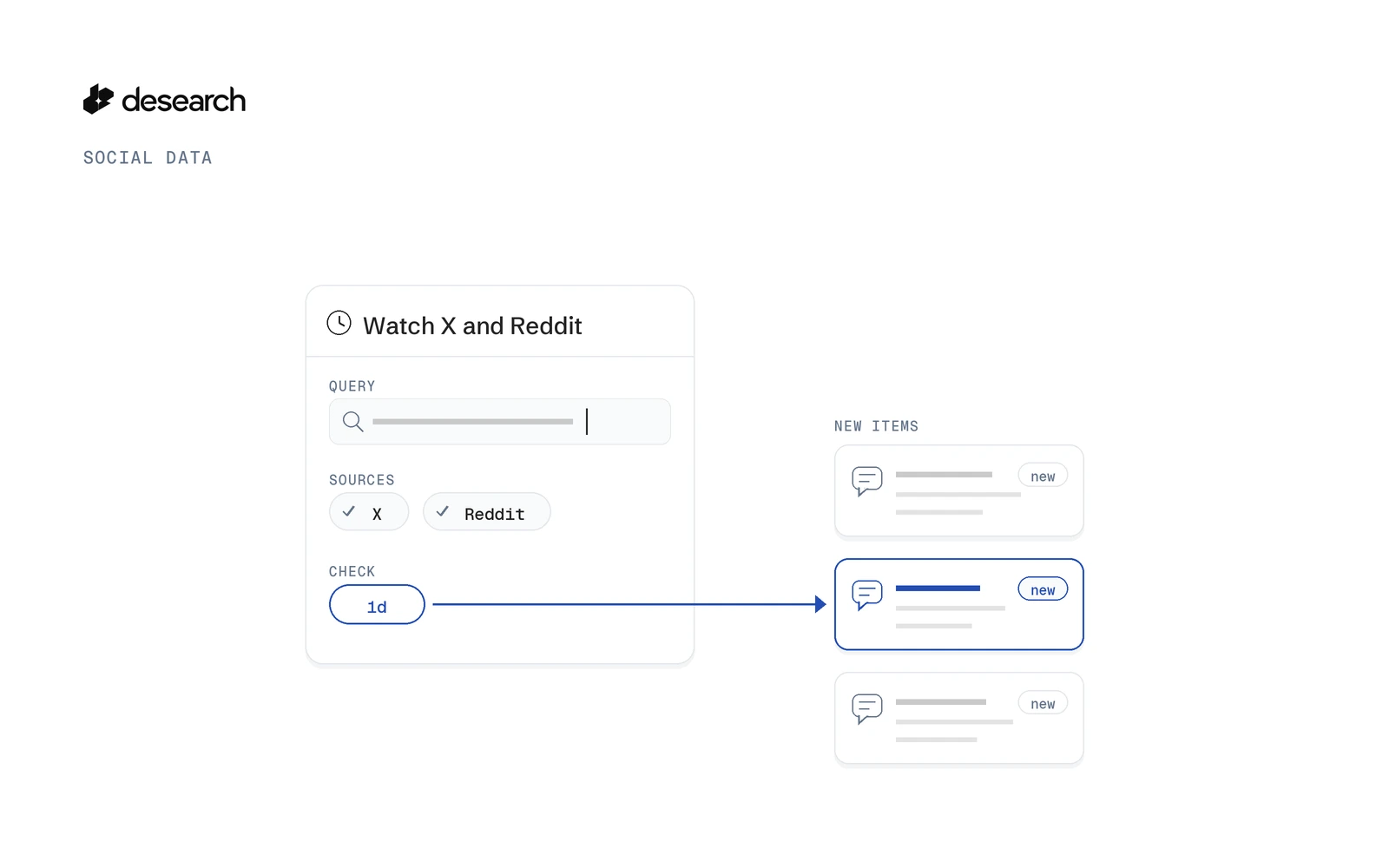
Desearch Monitors is a social media monitoring API that runs a saved query on a schedule and keeps only what is new on the sources you pick. For X and Reddit, you set the query once, choose X and Reddit as sources, pick an interval, and read new items later or get a webhook. Try it in Console Monitors.
This guide walks through the Console form first, then the same watch through the API.
What Desearch Monitors do
A monitor is a search that runs on a schedule. You describe what to watch once, in plain words. Each run then does four things:
- Searches your sources from where the previous run ended.
- Drops anything the monitor has already seen.
- Screens the rest for relevance with an AI classifier.
- Keeps the new matches, readable in Console and the API, and sends them to your webhook if you added one.
That last part is the point. You don't get the same post twice, and you don't have to write your own de-duplication or "seen" table.
Runs can happen every 1 hour, 3 hours, 6 hours, 12 hours, 1 day or 7 days. In the API those are 1h, 3h, 6h, 12h, 1d and 7d, and the default is 1d. Pick the slowest schedule that still fits how fast you need to react.
If you have been looking for a social listening API that you can point at a topic and leave running, this is the shape of it: one saved query, a schedule, and a stream of new items that passed a relevance check.
Create a watch for X and Reddit
You can create a monitor in Console without code, or with one API call. Both set the same things.
In Console
Open Console Monitors and click "New monitor". The form has four parts.
What to watch
- In "What should we watch?", write the query in plain words, up to 500 characters. For example: "Bittensor subnet launches and updates".
- "Name" is optional. It labels the monitor in Console and in webhook events.
- "Must match" is optional too. Add up to 5 rules an item has to meet to be kept, such as "About a subnet launch or major update".
Where to look
- Under "Where to look", pick the source cards "X" and "Reddit".
- "Web" and "X" are selected by default. If you only want X and Reddit, untick "Web".
How often and how strict
- In "Check", choose how often the monitor runs: "Every hour", "Every 3 hours", "Every 6 hours", "Every 12 hours", "Every day" (the default) or "Every week".
- "Relevance threshold" starts at 60. Slide it toward "More items" to keep more, or toward "Only the most relevant" to keep fewer, stricter matches.
Delivery
- New items always appear in Console and the API.
- Turn on "Send events to a webhook" if you also want them pushed to your own endpoint. More on that below.
- "Run the first check now" is on by default, so the first run starts as soon as you save.
Before you click "Create monitor", the form shows an estimate of the most a single run can cost. Check it, adjust sources or schedule if you need to, then create the monitor.
Not sure where to start? The page also offers templates under "Start from a template", including "Brand mentions on X" and "Reddit pain points". They fill the form for you, and you can edit any field before saving.
This setup covers the classic alert use cases. Twitter keyword alerts for a product name, Reddit keyword alerts for a problem your tool solves, or a way to track mentions on Twitter for your brand are all one monitor with the right query and sources.
With the API
The same monitor as one request to POST /desearch/monitors. This is a schema-based example, not a captured run:
curl --request POST 'https://api.desearch.ai/desearch/monitors' \
  --header "Authorization: $DESEARCH_API_KEY" \
  --header 'Content-Type: application/json' \
  --data '{
    "query": "Bittensor subnet launches and updates",
    "sources": ["x", "reddit"],
    "interval": "1d",
    "criteria": ["About a subnet launch or major update"],
    "min_score": 60
  }'
The fields map to the Console form:
| Field | Console label | Notes |
|---|---|---|
query | "What should we watch?" | Required, 3 to 500 characters |
name | "Name" | Optional label |
criteria | "Must match" | Optional, up to 5 rules |
sources | "Where to look" | Use ["x", "reddit"] for this guide |
interval | "Check" | 1h, 3h, 6h, 12h, 1d or 7d; default 1d |
min_score | "Relevance threshold" | 0 to 100; default 60 |
webhook | "Send events to a webhook" | Optional |
run_now | "Run the first check now" | Default true |
Only query is required. Want to watch only Reddit, or only X? Send one value in sources.
Read only what is new
Every item a monitor keeps stays readable at:
GET /desearch/monitors/{monitor_id}/itemsItems come back newest first. Use the monitor's ID from the create response, or find it with GET /desearch/monitors. Filter by source to read one platform at a time, set limit for the page size, and pass cursor to get the next page:
curl --request GET 'https://api.desearch.ai/desearch/monitors/MONITOR_ID/items?source=reddit&limit=20' \
  --header "Authorization: $DESEARCH_API_KEY"
Example response shape (illustrative values, not a real capture):
{
  "items": [
    {
      "item_id": "ITEM_ID",
      "run_id": "RUN_ID",
      "source": "reddit",
      "url": "https://www.reddit.com/r/example/comments/example_post",
      "title": "Example post title",
      "text": "Example post text that matched the watch.",
      "author": {},
      "published_at": "2026-01-01T00:00:00Z",
      "score": 75,
      "signals": {},
      "found_at": "2026-01-01T00:00:00Z",
      "data": {}
    }
  ],
  "next_cursor": "NEXT_CURSOR"
}
When next_cursor has a value, send it back as cursor to read the next page. When it is null, you have read everything.
Each item carries the run_id of the run that found it, so you can group items by run. source tells you which platform it came from, and url links back to the original post.
The useful mental model is "new since last run". You don't diff lists or store IDs on your side. The monitor already did that before the item reached this list.
Optional: webhook alerts
Polling the items route works well for a daily job. If you want new matches pushed to you instead, add a webhook.
In Console, turn on "Send events to a webhook". In the API, add a webhook object to the create request:
"webhook": {
  "url": "https://example.com/hooks/desearch",
  "events": ["monitor.items.found", "monitor.run.completed", "monitor.run.failed"]
}
The URL must be HTTPS on a public address, and redirects are not followed. You can subscribe to three events:
monitor.items.found: a run kept at least one item.monitor.run.completed: a run finished.monitor.run.failed: a run failed.
Most teams only need monitor.items.found. That is your Reddit alerts or X alerts channel: one event when something new and relevant shows up, nothing when it doesn't.
Events are signed with a secret. The create response returns webhook_secret once, when the webhook is added, so store it right away. If you lose it or need to replace it, POST /desearch/monitors/{monitor_id}/webhook/rotate-secret issues a new one, and POST /desearch/monitors/{monitor_id}/webhook/test sends a test event to your endpoint.
What else you can watch
X and Reddit are two of nine sources. The same monitor can also look at the web, YouTube, Threads, TikTok, Instagram, Facebook and Meta ads. In the API, that is web, youtube, threads, tiktok, instagram, facebook and meta_ads in the sources array.
You can mix them in one monitor, for example X plus YouTube for a launch, or keep one monitor per platform if you want separate feeds. For this guide, ["x", "reddit"] is all you need.
Billing
Creating a monitor is not billed. Each run pays for its searches at their list price, plus relevance screening per item.
You stay in control of the ceiling. max_run_cost_usd is the most one run can cost, and that amount is held on your balance while the run is in progress. The Console form shows an estimate of that ceiling before you click "Create monitor", and the API has a POST /desearch/monitors/estimate route for the same check. Estimating is not billed, and neither is reading items from GET /desearch/monitors/{monitor_id}/items.
List prices for the underlying searches are on the pricing page. For how balance and credits work in general, see pricing and billing.
FAQ
What does Desearch Monitors keep?
Only new items that pass the relevance screen. Each run drops what the monitor has already seen, then an AI classifier checks the rest against your query, your "Must match" rules and your relevance threshold.
Which sources can I watch?
Web, X, Reddit, YouTube, Threads, TikTok, Instagram, Facebook and Meta ads. In the API they are web, x, reddit, youtube, threads, tiktok, instagram, facebook and meta_ads. You can watch one source or several in the same monitor.
How often can it run?
Every 1 hour, 3 hours, 6 hours, 12 hours, 1 day or 7 days (1h to 7d in the API). The default is once a day.
How do I get alerts?
Add an optional webhook when you create the monitor and subscribe to monitor.items.found. The webhook secret is returned once, on create, so save it then. New items also always appear in Console and at the items route.
Where is the docs guide?
A Monitors guide in the docs is not live yet. Today, use Console Monitors and the OpenAPI spec at https://api.desearch.ai/openapi.json, which lists every Monitors route and field.
How is this different from "AI search monitoring for teams"?
AI search monitoring for teams is a blueprint for building your own monitoring pattern. This post covers Desearch Monitors, the product that runs the schedule, de-duplication and relevance screening for you. For a single search instead of a scheduled watch, see how to search hashtags on X, find old tweets by keyword, or find Reddit threads with Web Search API.
Get started
Open Console Monitors and save your first X and Reddit watch. New accounts get $5 in API credits after attaching a card in Console, then pay as they go.